Best IPTV Devices in 2026: Smart TV vs. Firestick vs. Android TV vs. Apple TV
Choosing the right hardware is one of the most critical decisions you will make when transitioning to Internet Protocol Television. Even the most resilient, high-bandwidth IPTV subscription running on enterprise server clusters will struggle if it is paired with underpowered, memory-starved streaming hardware.
A low-end streaming device with an inadequate processor or poorly implemented video decoding silicon will drop frames during live sports, freeze during rapid channel switching, crash when parsing large Electronic Program Guides (EPG), and overheat during extended 4K viewing sessions.
Conversely, an optimized streaming device equipped with dedicated hardware decoders, ample RAM, fast Wi-Fi 6 or gigabit Ethernet, and a refined media player application will transform your television into a fluid, cinema-grade entertainment powerhouse that outperforms traditional cable set-top boxes in speed, visual clarity, and responsiveness.
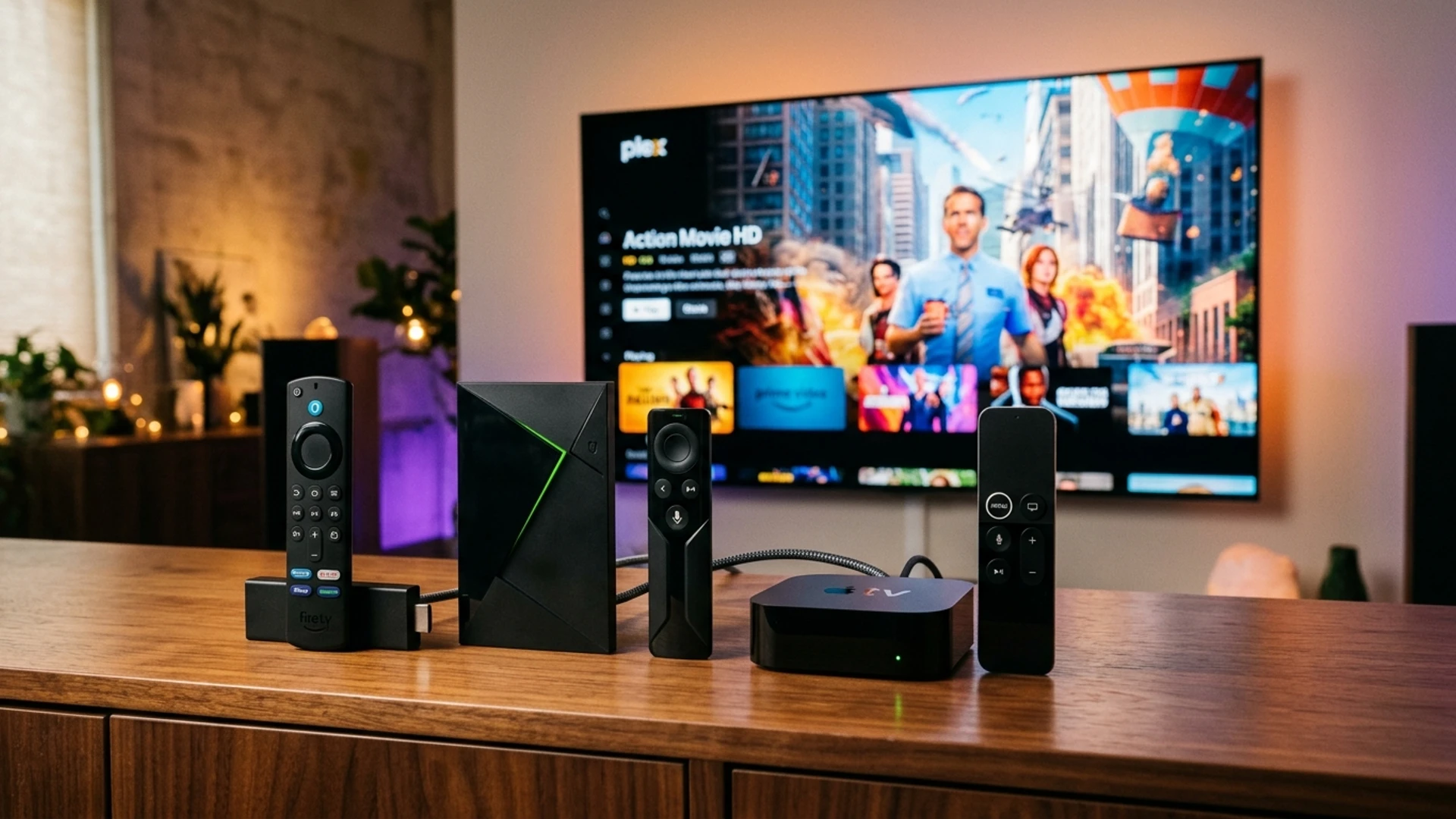
The streaming hardware market in 2026 offers a dizzying array of options: built-in Smart TV operating systems (Samsung Tizen, LG webOS, Google TV), plug-in streaming sticks (Amazon Fire TV Stick 4K Max, Chromecast with Google TV), dedicated powerhouse streaming boxes (NVIDIA Shield TV Pro, Apple TV 4K), and specialized IPTV set-top units (Formuler, BuzzTV).
This comprehensive hardware guide is the definitive benchmark analysis for 2026. Below, we dissect each major hardware category, compare operating system capabilities, analyze processing benchmarks and codec support, evaluate compatible media player applications, and provide tailored hardware recommendations based on your specific budget and viewing priorities.
The Hardware Pyramid: Benchmarking IPTV Streaming Tiers
To understand how streaming hardware impacts playback quality, consider the four distinct performance tiers present in the 2026 hardware landscape:
                         ▲
                        / \
                       /   \     TIER 1: FLAGSHIP POWERHOUSES
                      / Tier\    (NVIDIA Shield TV Pro, Apple TV 4K, Formuler Z11)
                     /   1   \   • Gigabit Ethernet, 3GB+ RAM, AI Upscaling, Zero Lag
                    /─────────\
                   /   Tier    \   TIER 2: CERTIFIED STREAMING STICKS & BOXES
                  /     2       \  (Fire TV Stick 4K Max, Onn 4K Pro, Chromecast Google TV)
                 /───────────────\ • Dedicated HEVC/AV1 Decoders, Great Wi-Fi 6, Best Value
                /      Tier       \
               /        3          \ TIER 3: BUILT-IN SMART TV PLATFORMS
              /─────────────────────\(Samsung Tizen, LG webOS, Hisense VIDAA)
             /        Tier 4         \• No extra remotes, but memory-constrained & 100M LAN
            /─────────────────────────\
           /                           \ TIER 4: GENERIC UNBRANDED ANDROID BOXES
          /─────────────────────────────\(Avoid: Software decoding, malware risks, overheating)
Key Hardware Requirements for 4K 60FPS IPTV:
- Processor (CPU/GPU): Quad-core 64-bit ARM processor operating at 1.8 GHz or higher, paired with a dedicated graphics processing unit (GPU) capable of hardware-accelerated video decoding.
- System Memory (RAM): Minimum 2 GB of RAM for smooth 1080p playback; 3 GB to 4 GB of RAM is strongly advised for 4K sports multi-view and rapid EPG caching.
- Internal Storage: At least 8 GB to 16 GB of internal flash memory to store the operating system, player application data, and multi-day XMLTV EPG databases.
- Network Interface: Wi-Fi 6 (802.11ax) or a built-in physical RJ45 Ethernet port.
- Hardware Decoders: Native silicon support for H.264, H.265/HEVC (10-bit), VP9 Profile 2, and AV1 decoding.
Category 1: Built-In Smart TV Operating Systems (Samsung, LG, Google TV)
For many households, the most appealing way to watch IPTV is directly through their television's built-in operating system without purchasing an additional streaming dongle, power brick, or secondary remote control.
1. Samsung Smart TVs (Tizen OS)
Samsung is the world's leading television manufacturer by market share, running its proprietary Linux-based Tizen operating system.
- Compatible IPTV Players: IBO Player, Nanomid, Smart IPTV, Bay TV, DuplexPlay.
- The Experience: Modern Samsung televisions (manufactured from 2022 onward) feature fast processors capable of decoding 4K HDR streams cleanly. Apps like IBO Player install directly from the Samsung App Store and provide snappy channel zapping.
- Limitations: Tizen is a closed ecosystem. You cannot install popular Android players like TiviMate. Furthermore, Samsung limits background application caching; if your TV runs low on internal memory, the IPTV app may take longer to load its EPG guide.
- Network Note: Most Samsung TVs—including high-end Neo QLED and OLED models—feature a 100 Mbps Fast Ethernet port rather than Gigabit Ethernet. While 100 Mbps is more than enough for a single 4K stream (which requires 25–35 Mbps), optical Wi-Fi or USB-to-Ethernet adapters may be required for power users.
2. LG Smart TVs (webOS)
LG televisions are celebrated for their class-leading OLED display panels and intuitive Magic Remote pointer, running the proprietary webOS platform.
- Compatible IPTV Players: IBO Player, Nanomid, Smart IPTV, IPTV Smarters Pro, Flix IPTV.
- The Experience: On LG C-Series and G-Series OLEDs, picture quality is breathtaking. Deep black levels and instant pixel response times make 60 FPS sports look extraordinarily sharp. Navigating menus with the Magic Remote's on-screen mouse pointer is remarkably convenient.
- Limitations: Similar to Samsung, webOS is a proprietary operating system that cannot sideload Android APK files. Application selection is restricted to what LG approves in the LG Content Store. Older budget LG models (pre-2021) can suffer from sluggish interface navigation.
3. Integrated Android TV & Google TV (Sony, TCL, Hisense, Philips)
Televisions from Sony, TCL, and Hisense frequently run certified Google TV or Android TV directly out of the box.
- Compatible IPTV Players: TiviMate, IPTV Smarters Pro, XCIPTV, OTT Navigator, Sparkle TV, IBO Player.
- The Experience: This is by far the best built-in TV ecosystem. Because Google TV has direct access to the Google Play Store, you can install the premier IPTV player—TiviMate—directly without sideloading.
- Performance Caveat: High-end models (such as Sony Bravia XR series) have powerful internal MediaTek chips that run IPTV flawlessly. However, budget TCL or Hisense televisions often cut corners on internal RAM (often supplying only 1.5 GB), which can lead to app stutter after extended streaming sessions.
Optimize Your Hardware with Wizard TV
Experience ultra-fast channel zapping, 60 FPS sports, and seamless 4K HDR playback on your favorite streaming device with Wizard TV high-performance IPTV servers.
View Compatible PlansCategory 2: Plug-In Streaming Media Sticks (Amazon Fire TV & Google)
Plug-in streaming media sticks represent the sweet spot for the vast majority of IPTV subscribers, combining low cost, portable form factors, and immense software flexibility.
┌─────────────────────────────────┬─────────────────────────────────┬─────────────────────────────────┐
│     Fire TV Stick 4K (Max)      │   Chromecast with Google TV     │       Walmart Onn 4K Pro        │
├─────────────────────────────────┼─────────────────────────────────┼─────────────────────────────────┤
│ • OS: Fire OS (Android-based)   │ • OS: Google TV (Official Play) │ • OS: Google TV (Official Play) │
│ • Sideloading: Downloader app   │ • Sideloading: Direct Playstore │ • Sideloading: Direct Playstore │
│ • Wi-Fi: Wi-Fi 6E (Max model)   │ • Wi-Fi: Wi-Fi 5 (802.11ac)     │ • Wi-Fi: Wi-Fi 6 + Built-in LAN │
│ • RAM: 2 GB                     │ • RAM: 2 GB                     │ • RAM: 3 GB (High Performance)  │
│ • Best Player: TiviMate         │ • Best Player: TiviMate         │ • Best Player: TiviMate         │
└─────────────────────────────────┴─────────────────────────────────┴─────────────────────────────────┘
1. Amazon Fire TV Stick 4K & Fire TV Stick 4K Max (2nd Gen)
The Amazon Fire TV Stick family is the undisputed king of IPTV streaming sticks globally.
- Hardware Architecture: The 2nd Generation Fire TV Stick 4K Max is equipped with a 2.0 GHz quad-core processor, 2 GB of RAM, 16 GB of internal flash storage, and cutting-edge Wi-Fi 6E wireless support. It also includes native hardware decoding for the next-generation AV1 codec.
- IPTV Compatibility: Outstanding. Using the free Downloader application from the Amazon Appstore, users can install TiviMate, IPTV Smarters Pro, or any Android APK in seconds.
- Playback Stability: The 4K Max handles 1080p 60 FPS sports, 4K HDR movie feeds, and 2-screen Multi-View without breaking a sweat.
- Best Practice: Always power the Firestick using its included wall adapter rather than your television's USB service port. TV USB ports typically deliver only 0.5A of power, leading to brownout reboot crashes during high-intensity 4K video decoding.
2. Chromecast with Google TV (4K)
Google's signature streaming dongle plugs directly into your HDMI port and runs the clean, content-centric Google TV interface.
- Hardware Architecture: Quad-core ARM Cortex-A53 processor, 2 GB of RAM, 8 GB of storage, and dual-band Wi-Fi 5.
- IPTV Compatibility: Flawless. Access to the official Google Play Store means you can download and update TiviMate and other players directly with a single click.
- Limitations: The primary drawback of the Chromecast 4K is its limited internal storage (only 8 GB total, with barely 4.4 GB available to the user). Installing multiple streaming apps can exhaust local memory, requiring a USB-C hub to attach external flash storage.
3. Walmart Onn 4K Pro Streaming Device
Released recently to universal acclaim, the Onn 4K Pro has become a viral sensation in the cord-cutting community.
- Hardware Architecture: Offers specifications unheard of at its budget price point: a fast quad-core chip, a massive 3 GB of RAM, 32 GB of internal storage, Wi-Fi 6, a built-in physical 100M Ethernet port, and a full-size USB 3.0 port for external hard drive recording.
- Verdict: If you are in North America, the Onn 4K Pro represents the absolute best value-for-money IPTV hardware on the market today.
Category 3: Flagship Powerhouse Set-Top Boxes (NVIDIA & Apple)
For home theater enthusiasts, sports purists, and power users who demand zero lag, instant channel zapping, and full 4-screen multi-view capabilities, flagship streaming boxes stand in a league of their own.
1. NVIDIA Shield TV Pro
Even years after its release, the NVIDIA Shield TV Pro remains the undisputed champion of Android-based IPTV hardware.
- Silicon Power: Powered by the legendary NVIDIA Tegra X1+ processor paired with a 256-core NVIDIA GPU and 3 GB of high-speed RAM.
- Gigabit Networking: Features a true built-in 1000 Mbps Gigabit Ethernet port, ensuring uncompromised throughput with zero network overhead.
- AI-Enhanced Upscaling: One of the Shield's most extraordinary features is its onboard AI Upscaling engine. When streaming standard 720p or 1080p cable feeds, the Shield's neural network sharpens textures, clarifies facial details, and cleans up compression noise in real time, making Full HD broadcasts look nearly indistinguishable from native 4K.
- Audio Supremacy: Full hardware passthrough support for Dolby Atmos, DTS-X, TrueHD, and Dolby Digital Plus.
- The Ultimate Multi-View Machine: The Shield TV Pro can effortlessly render a 4-screen quad Multi-View sports grid in full 1080p 60 FPS simultaneously without dropping a single frame or overheating.
2. Apple TV 4K (3rd Generation)
Apple's premier streaming box brings the blistering power of the A15 Bionic chip into your living room.
- Processing Power: The A15 Bionic chip delivers processing power that dwarfs every other streaming device on the market. Channel zapping in compatible players is virtually instantaneous—channels load the microsecond you press the remote.
- Interface & Display Synchronization: Apple TV's tvOS features automatic Frame Rate and Dynamic Range Matching, ensuring your television panel synchronizes with European 50Hz and North American 60Hz broadcast feeds with zero motion judder.
- Premier Players: Paired with IPTVX or Smarters Player Lite, Apple TV provides the most visually stunning, polished IPTV interface in existence, rivaling Apple's own first-party streaming applications in fluidity.
- Hardware Tier: The 128 GB model includes built-in Gigabit Ethernet and Thread networking support.
Category 4: Dedicated IPTV Set-Top Boxes (Formuler & BuzzTV)
Unlike general-purpose streaming devices (like Firesticks or Apple TV) that run IPTV through third-party apps, dedicated IPTV set-top boxes are engineered strictly from the ground up for linear television streaming.
Dedicated IPTV Set-Top Box Architecture:
[Custom Linux/Android OS] ──> [Hardware-Direct TV Guide Integration] ──> [MYTVOnline Middleware]
                                                                                │
                                                            (Dedicated Remote: EPG, VOD, PVR)
1. Formuler Z11 Pro Max
The Formuler Z11 Pro Max represents the pinnacle of dedicated IPTV hardware engineering.
- MYTVOnline 3 (MOL3): Formuler devices run custom proprietary middleware called MYTVOnline. MOL3 is universally recognized as one of the most intuitive, feature-packed television interfaces ever built. It features unified universal search across multiple playlists, lightning-fast EPG schedule population, seamless cloud catch-up, and picture-in-picture.
- Premium Hardware: 4 GB of DDR4 RAM, 32 GB of storage, Realtek Gigabit Ethernet, Wi-Fi 6, and a high-end ergonomic television remote equipped with hotkeys for EPG, Group, VOD, and Recording.
- Target Audience: Perfect for users transitioning from traditional satellite/cable boxes who want a dedicated television box that boots directly into live TV with zero home screen clutter.
2. BuzzTV (X5 Series)
BuzzTV is another premier dedicated hardware manufacturer running customized Android OS.
- Strengths: Features the BuzzTV 5 streaming utility, dual external Wi-Fi antennas for superior wireless range, smart backup channel mapping, and extensive PVR recording scheduling options.
Comprehensive IPTV Hardware Benchmark Matrix
The table below provides an objective side-by-side comparison of the leading IPTV streaming devices in 2026:
| Device Model | Operating System | RAM / Storage | Max Resolution & FPS | Networking | Best IPTV App | Performance Score |
|---|---|---|---|---|---|---|
| NVIDIA Shield Pro | Android TV (Google) | 3 GB / 16 GB | 4K @ 60fps (AI Upscale) | Gigabit LAN + Wi-Fi 5 | TiviMate | 99/100 (Unmatched) |
| Apple TV 4K (Gen 3) | tvOS (Apple) | 4 GB / 128 GB | 4K @ 60fps (HDR10+) | Gigabit LAN + Wi-Fi 6 | IPTVX | 98/100 (Ultra Fast) |
| Formuler Z11 Pro Max | Custom Android | 4 GB / 32 GB | 4K @ 60fps (AV1/HEVC) | Gigabit LAN + Wi-Fi 6 | MYTVOnline 3 | 97/100 (Best TV UI) |
| Fire TV Stick 4K Max | Fire OS (Amazon) | 2 GB / 16 GB | 4K @ 60fps (AV1/HEVC) | Wi-Fi 6E (LAN Adapter) | TiviMate | 92/100 (Best Value) |
| Walmart Onn 4K Pro | Google TV | 3 GB / 32 GB | 4K @ 60fps (Dolby Vision) | 100M LAN + Wi-Fi 6 | TiviMate | 93/100 (Best Budget) |
| Chromecast Google TV | Google TV | 2 GB / 8 GB | 4K @ 60fps (HDR10+) | Wi-Fi 5 (LAN Adapter) | TiviMate | 86/100 (Low Storage) |
| Samsung Smart TV | Tizen OS | 1.5–2 GB / 4 GB | 4K @ 60fps (Display Nat.) | 100M LAN + Wi-Fi 5 | IBO Player | 82/100 (App Limited) |
| LG Smart TV | webOS | 1.5–2 GB / 4 GB | 4K @ 60fps (Display Nat.) | 100M LAN + Wi-Fi 5 | IBO Player | 83/100 (App Limited) |
| Generic Android Box | Tablet Android AOSP | 1–2 GB / Fake | 1080p Choppy / Fake 4K | Cheap 100M / 2.4G | Smarters | 35/100 (DO NOT BUY) |
Essential Hardware Peripherals and Accessories for IPTV
Optimizing your streaming device often involves more than just plugging it into an HDMI port. Adding the right hardware accessories can substantially enhance performance, network reliability, and everyday convenience.
[Essential Streaming Peripherals Ecosystem]
├── Network Stability ─────> USB Gigabit Ethernet Adapter (Bypasses Wi-Fi drops)
├── Storage Expansion ─────> USB-OTG Cable + 128GB Flash Drive (PVR Live Recording)
├── Thermal Management ────> 1-Foot HDMI Extension Cable (Dissipates TV chassis heat)
└── Remote Control ────────> Ergonomic Backlit Remote with Dedicated EPG / Channel Buttons
1. USB-OTG (On-The-Go) Splitter Cables
Streaming sticks like the Amazon Fire TV Stick 4K Max or Chromecast with Google TV feature only a single micro-USB or USB-C power port.
- How It Works: A 2-in-1 USB-OTG cable splits this single port into two: one side delivers power from your wall adapter, while the other provides a standard USB 2.0 or 3.0 female port.
- Functionality Unlocked: You can attach a high-speed 128 GB or 256 GB USB flash drive directly to your streaming stick. This gives your device the storage capacity required to record hours of live sports matches, pause live television with local time-shifting, and store massive EPG guide caches without running out of internal memory.
2. Dedicated USB-to-Ethernet Adapters
If your streaming stick lacks a built-in Ethernet port (as is the case with standard Firesticks and Chromecasts), wireless Wi-Fi is not your only option.
- Official vs. Third-Party Gigabit Adapters: The official Amazon Ethernet adapter caps speeds at 100 Mbps. While 100 Mbps is plenty for a 4K stream, third-party gigabit USB-OTG network adapters (featuring Realtek RTL8153 chipsets) deliver up to 300–400 Mbps throughput over the Firestick's USB bus with significantly lower latency.
- Plug-and-Play Setup: Modern streaming operating systems natively recognize certified USB Ethernet chipsets with zero driver installation required.
3. HDMI Extension Cables for Thermal Dissipation
Modern television displays generate significant heat across their rear metal panels. When a streaming stick is plugged directly into a recessed rear HDMI port, it is subjected to ambient operating temperatures exceeding 60°C to 70°C.
- The Problem: When streaming sticks overheat during intense 4K HEVC video decoding, their onboard silicon triggers thermal throttling, dropping clock speeds and causing severe frame drops.
- The Solution: Use a flexible 1-foot or 3-foot high-speed HDMI extension cable. This moves the streaming stick away from the hot television chassis and into cooler, free-flowing ambient air, completely preventing heat-related playback stutter.
4. High-Performance Ergonomic Remote Controls
The remote control is your daily physical touchpoint for navigating thousands of channels.
- Backlit Remote Controls: Searching for channel numbers or EPG buttons in a darkened home theater room is frustrating with basic remotes. Upgrading to a backlit remote (such as the Amazon Alexa Voice Remote Pro or Formuler GTV-BT1) ensures every button is illuminated the moment you pick it up.
- Dedicated Macro Buttons: Premium remotes feature customizable shortcut keys, allowing you to launch your IPTV application, open the guide, or toggle Multi-View with a single click.
Software Optimization: Pairing Hardware with the Right Player
A powerful streaming device will feel sluggish if paired with an unoptimized media player application. Below is the ideal hardware-to-software pairing matrix:
1. Android TV, Google TV & Fire TV: The TiviMate Masterclass
If you own an NVIDIA Shield, a Firestick 4K Max, or an Onn 4K Pro, TiviMate Premium is the uncontested gold standard:
- ExoPlayer Video Engine: TiviMate is built upon Google's high-performance ExoPlayer media framework, utilizing hardware-accelerated MediaCodec video decoding.
- Unrivaled EPG Customization: Configure multi-day timelines, adjust channel row heights, customize font sizes, and assign custom logos.
- Automated Startup: Configure TiviMate to launch automatically whenever your TV box powers on, providing a seamless "instant cable" experience.
2. Apple TV 4K: The IPTVX Cinema Interface
For Apple TV 4K owners, IPTVX transforms IPTV playlists into an interface that feels like Apple's native tvOS UI:
- Metal Framework Acceleration: Leverages Apple's Metal graphics framework for silky-smooth 60 FPS scrolling through thousands of titles.
- iCloud Synchronization: Your favorites, watched history, and playlist credentials synchronize automatically across your Apple TV, iPad, and iPhone.
3. Samsung & LG Smart TVs: IBO Player and Nanomid
For built-in television operating systems without sideloading capabilities:
- IBO Player: Fast, lightweight, and capable of hardware 4K video playback with minimal memory overhead.
- Web Portal Provisioning: Enter your MAC address on the IBO Player website to remotely upload your Wizard TV Xtream Codes credentials directly to your TV.
4 Common Hardware Buying Blunders to Avoid
Before purchasing hardware, ensure you avoid these four widespread purchasing pitfalls:
Blunder 1: Buying Cheap Generic "Fully Loaded" Android TV Boxes
Online marketplaces like eBay, AliExpress, and unvetted Amazon sellers are flooded with generic plastic TV boxes bearing names like "T95," "MXQ Pro," or "X96."
- Why They Fail: These boxes run hacked tablet versions of Android (AOSP) rather than official Android TV OS. They lack Google Widevine Level 1 DRM certification, feature uncalibrated budget processors (Allwinner or Rockchip) that lack hardware HEVC decoders, and frequently come pre-infected with malicious background botnet malware. Always purchase certified Google TV, Fire TV, or Apple hardware.
Blunder 2: Assuming a 4K Streaming Stick Guarantees 4K on a 1080p TV
Buying an expensive 4K streaming stick will not magically transform a 1080p television into a 4K display. If your TV panel is native 1080p, the streaming device will downscale 4K feeds to 1080p before outputting video over HDMI. However, purchasing a 4K streaming stick for a 1080p TV is still beneficial because 4K sticks feature significantly faster processors and more RAM than basic non-4K sticks.
Blunder 3: Neglecting Ethernet Connectivity
Wi-Fi is inherently prone to radio frequency interference, signal attenuation through walls, and latency spikes caused by household devices. If your goal is zero buffering during high-stakes live sports, choose a device that features a built-in Ethernet port (like the NVIDIA Shield, Onn 4K Pro, or Formuler) or purchase an inexpensive USB-Ethernet adapter for your Firestick.
Blunder 4: Buying Hardware Without Checking App Compatibility
Never buy a device without verifying that your preferred IPTV application is compatible with its operating system. If your heart is set on using TiviMate, you must purchase an Android TV, Google TV, or Fire TV device. If you buy an Apple TV or a Samsung TV, TiviMate cannot be installed.
Tailored Hardware Recommendations: Which Device Fits You?
Use this decision matrix to identify your ideal streaming companion:
[IPTV Hardware Decision Flowchart]
  ├── For Casual Viewers & Beginners ───────> Amazon Fire TV Stick 4K Max or Onn 4K Pro
  ├── For Ultimate Home Theaters & Sports ──> NVIDIA Shield TV Pro (Gigabit + AI Upscale)
  ├── For Apple Ecosystem Households ───────> Apple TV 4K (A15 Bionic + IPTVX)
  ├── For Traditional Cable-Box Feel ───────> Formuler Z11 Pro Max (MYTVOnline 3)
  └── For Zero Extra Hardware / Remotes ───> Modern Samsung / LG Smart TV with IBO Player
- The Best Overall Value for 90% of Users: Amazon Fire TV Stick 4K Max (2nd Gen) or Walmart Onn 4K Pro. Exceptional speed, open app sideloading, Wi-Fi 6, and full support for TiviMate at under $50.
- The Ultimate High-End Flagship: NVIDIA Shield TV Pro. Unrivaled processing muscle, AI-enhanced upscaling, gigabit Ethernet, and flawless 4-screen multi-view for sports fanatics.
- The Best for Apple Users: Apple TV 4K (3rd Gen). Blistering A15 processing, zero interface lag, and gorgeous modern design paired with IPTVX.
- The Best for Non-Tech-Savvy Family Members: Formuler Z11 Pro Max. Boots directly into live TV with a traditional remote control and unified EPG grid that feels identical to satellite television.
Why Wizard TV Operates Flawlessly Across All Hardware
At Wizard TV, we recognize that modern households utilize diverse hardware ecosystems. That is why our streaming platform is engineered for universal multi-platform compatibility:
- Universal Playlist Integration: Connect effortlessly using standard Xtream Codes API credentials or M3U Plus playlists across any operating system.
- Comprehensive App Support: Verified, optimized playback on TiviMate, IPTV Smarters, IBO Player, IPTVX, Nanomid, XCIPTV, and Kodi.
- Adaptive Codec Delivery: Our servers dynamically negotiate video streams using modern HEVC/H.265 and H.264 compression standards to match your device's exact hardware decoding silicon.
- Dedicated Device Setup Tutorials: Step-by-step installation guides with screenshots for every major streaming stick, box, and Smart TV platform on our Wizard TV Installation Guide.
Ready to unlock the full potential of your streaming hardware? Explore our subscription tiers today on the Wizard TV Pricing page.
Setup Wizard TV on Any Screen in Minutes
Step-by-step installation guides for Firestick, Apple TV, Android boxes, and Samsung/LG Smart TVs. Backed by 24/7 technical assistance and anti-freeze technology.
Get Wizard TV SubscriptionFrequently Asked Questions
Conclusion
Your streaming device is the direct physical interface between your eyes and your entertainment. Pairing a high-caliber IPTV subscription with capable hardware is the key to unlocking fluid 60 FPS live sports, pristine 4K video, rapid channel switching, and an intuitive, frustration-free viewing experience.
Whether you choose the versatile Amazon Fire TV Stick 4K Max, the powerhouse NVIDIA Shield TV Pro, the refined Apple TV 4K, or a convenient Smart TV application, investing in certified hardware ensures that your home entertainment system delivers flawless television every day.
Ready to test your hardware with a premier, anti-freeze IPTV service? Explore Wizard TV Pricing today and experience the ultimate in live television streaming.